
Nutrition Management Platform
Nutrition management, wherever meals happen.
Connect meal capture through the Food Recognition App, the Food Recognition Kiosk, or both, with one professional dashboard for nutrition monitoring and planning.
For dietitians, nutrition teams and organizations supporting patients, clients and athletes.
MEAL CAPTURE → PROFESSIONAL FOLLOW-UP
Food Recognition App
Remote capture
Food Recognition Kiosk
On-site capture
ONE PROFESSIONAL WORKSPACE
Nutritional Management Dashboard
Review intakes.
Set nutrition goals.
Assign meal plans.
CHOOSE YOUR SETUP
Choose how your users record their meals.
Three ways to capture meal data.
One workspace for professional follow-up.
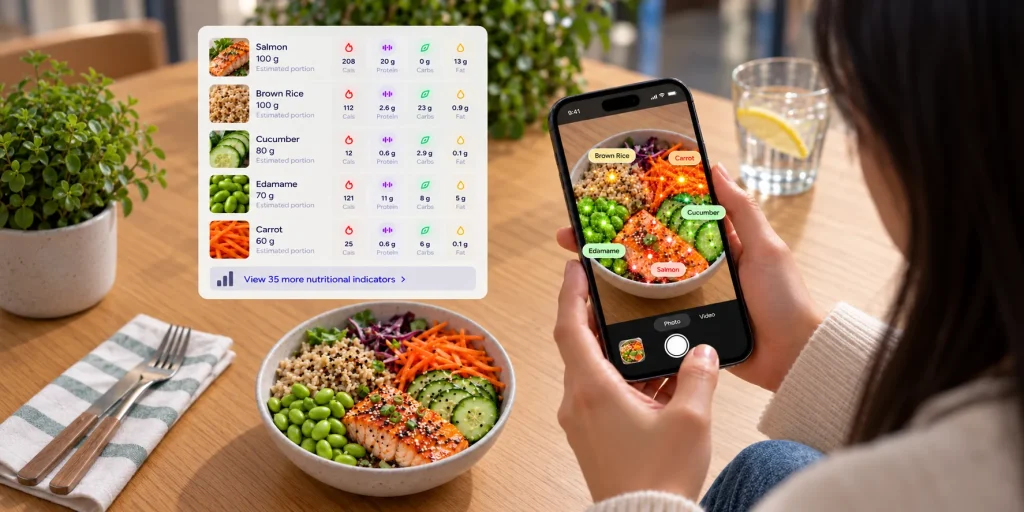
Remote meals monitoring
Users log their meals using the Food Recognition App. You monitor their intake, set nutritional goals and assign meal plans through the Nutrition Management Dashboard.
Online subscription available
INCLUDED COMPONENTS
- Food Recognition App
- Food AI Engine
- Nutritional Management Dashboard
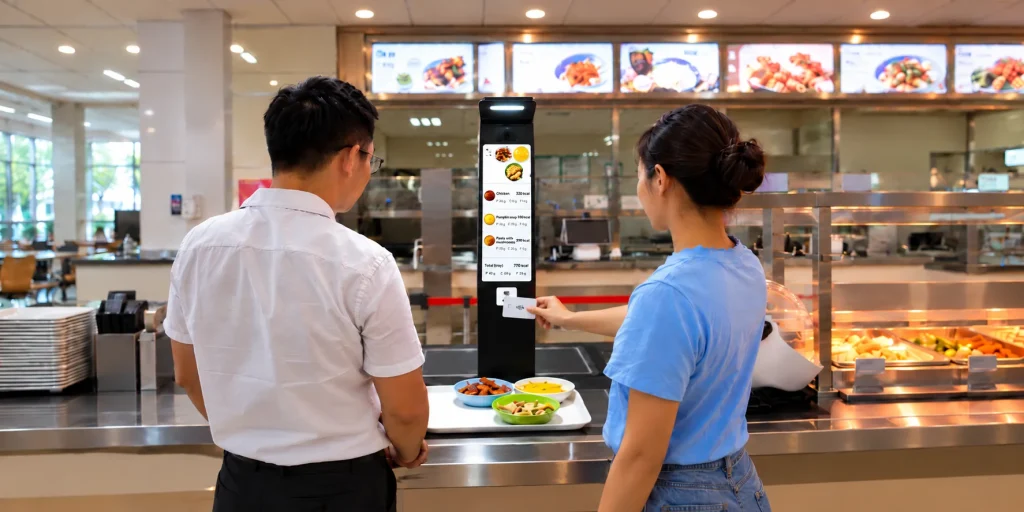
On-site meals monitoring
Record meal trays using the Food Recognition Kiosk at your premises. Link the records to the Nutrition Management Dashboard to carry out professional nutritional monitoring.
Deployment scoped with LogMeal
INCLUDED COMPONENTS
- Food Recognition Kiosk
- Tray Recognition AI Engine
- Nutritional Management Dashboard
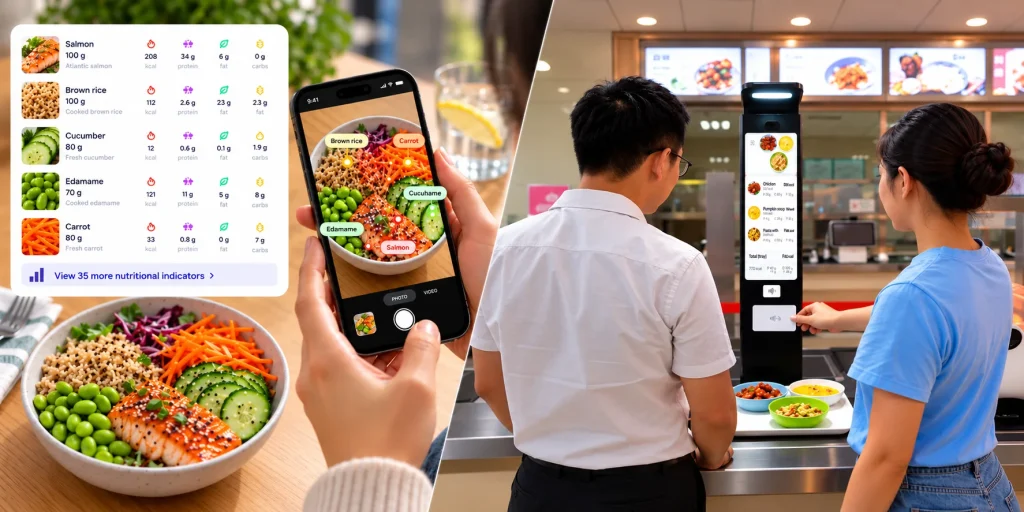
Hybrid meals monitoring
It streamlines nutritional monitoring both within and outside the centre by integrating records from the Food Recognition App and the Food Recognition Kiosk onto a single platform.
Deployment scoped with LogMeal
INCLUDED COMPONENTS
- Food Recognition App + Food AI Engine
- Food Recognition Kiosk + Tray Recognition AI Engine
- Nutritional Management Dashboard
Powered by Food AI Engine & Tray Recognition AI Engine. Explore the individual solutions.
Record what is served. Account for what is left.
Capture the meal before eating and the leftovers afterwards. LogMeal estimates the remaining food and calculates the amount consumed from the difference.
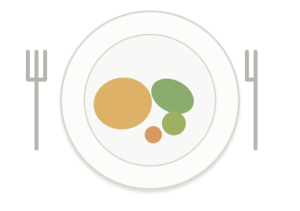
Initial meal
Record the initial food and portions.
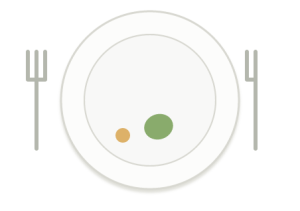
Leftovers
Record any food left uneaten.
03 · ACTUAL INTAKE
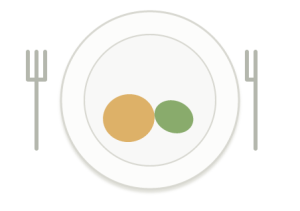
Food consumed
Subtract the leftovers from initial meal.
Food before − Leftovers after = Estimated food consumed.
No after-meal photo? The system assumes the whole recorded meal was eaten. This is an assumption, not confirmation that no food was left.
For nutrition professionals
A single dashboard for nutritional management: review, set targets, plan and monitor.
The Nutritional Management Dashboard is the professional workspace within Nutrition Management Platform. Use it to manage the meal records captured through the IA for Food Recognition from the App, the Kiosk, or both.
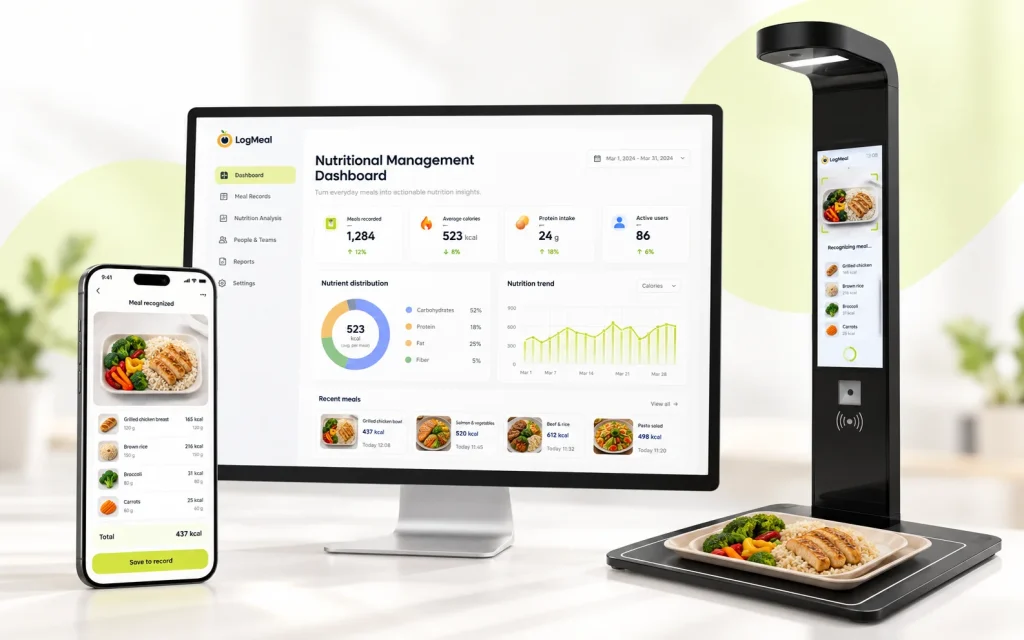
Client & Patient Management
Food Intake Monitoring
Review meal photographs, food intake history, portion estimates and detailed nutritional information.
Personalized Nutrition Goals
Set and adjust individual targets for energy, macronutrients and supported nutritional indicators..
Nutrition Plans & Meal Assignment
Create nutritional plans and assign specific foods or meals to users according to their needs.
Nutrition Reports & Analytics
Review daily and weekly nutritional summaries, food-group consumption and progress against nutritional goals.
Body Measurements & Progress
Record body measurements and track changes over time alongside nutritional information..
Custom Recipes & Personalization
Manage custom recipes, meal occasions and nutritional indicators for personalized monitoring.
Data Export & Professional Access
Export nutritional records for further analysis and manage access to assigned users through authorized professional accounts.
Monitor what your clients actually eat
- Review individual food intake records, meal photographs, and detailed nutritional information.
- Access the date, time, and meal occasion, along with ingredients, quantities, and up to 39 macro- and micronutrient indicators. Where supported, compare food served, leftovers, and estimated actual consumption for each dish.
- Explore intake history to identify eating patterns, monitor dietary habits, and support personalized nutritional recommendations.
Plan meals & personalize nutritional goals
- Define nutritional targets, create structured nutrition plans and assign meals.
- Adapt individual monitoring to each user’s dietary requirements.
- Create your own recipes by adding ingredients and specifying quantities, then share them with your users through the LogMeal Food Recognition App.
Turn food records into nutritional insights
- Access daily and weekly nutritional summaries, review progress against goals and export information (PDF, TSV, CSV) for professional analysis.
Explore All Nutrition Management Dashboard Features
Discover the tools available to nutrition professionals for managing clients, monitoring food intake, setting personalized goals, planning meals and analyzing nutritional progress.
From individual follow-up to group management, the Nutrition Management Dashboard brings nutritional information and professional management tools together in one workspace.
Client, Patient & Group Management
Manage individual clients, patients, athletes and groups through a centralized professional workspace.
Features:
Client & Patient Management: Access and manage individual clients, patients and athletes assigned to your professional account.
Group Management: Organize and monitor groups of users within your organization.
Individual User Profiles: Access personal information and nutritional records for each assigned user.
Client Activity Monitoring: Identify whether users are actively recording their meals.
Nutritional Goal Status: Check whether individual users are meeting their established nutritional goals.
User Search: Quickly locate individual users within your organization.
Date Range Selection: Select specific periods to review nutritional information and activity.
Food Intake History & Monitoring
Monitor what your clients actually eat by reviewing meal photographs, food records, quantities and detailed nutritional information.
Features:
Complete Food Intake History: Access the chronological history of meals recorded by each user.
Meal Photographs: Review photographs associated with individual food intake records.
Food & Dish Identification: View the foods and dishes registered for each meal.
Ingredients & Quantities: Access detailed information about the ingredients and estimated quantities of each dish.
Detailed Nutritional Analysis: Review energy values and up to 39 nutritional indicators, including macro- and micronutrients.
Meal Occasion Tracking: Identify breakfast, lunch, dinner, snacks and other recorded meal occasions.
Date & Time Tracking: Review when each meal was consumed or recorded.
Intake Calendar: Navigate food records using a calendar and selected dates.
Estimated Actual Food Intake: Where supported, compare food served and leftovers to estimate actual consumption.
Food Waste Monitoring: Review estimated leftovers and food waste in configurations supporting pre- and post-meal analysis.
Personalized Nutritional Goals
Define individual nutritional objectives and monitor progress against established targets.
Features:
Personalized Nutritional Goals: Set individual daily nutritional targets based on each client’s requirements.
Energy Goals: Define daily calorie targets.
Macronutrient Goals: Configure individual targets for proteins, carbohydrates and fats.
Micronutrient Goals: Establish targets for supported vitamins, minerals and other nutritional indicators.
Up to 39 Nutritional Indicators: Monitor a comprehensive range of macro- and micronutrients.
Manual Goal Configuration: Define and adjust nutritional targets individually.
Automatic Goal Calculation: Calculate supported nutritional goals using Dietary Reference Intakes (DRIs) and established nutritional recommendations.
Goal Comparison: Compare recorded nutritional intake against individual targets.
Nutrient Evolution Charts: Visualize historical changes in the consumption of specific nutrients.
Nutritional Alerts & Warnings: Identify deviations from configured nutritional targets.
Historical Nutritional Comparison: Compare current nutritional information with previous records.
Meal Planning & Intake Assignment
Support personalized nutritional planning by scheduling and assigning specific foods, dishes and quantities to individual users.
Features:
Food Intake Assignment: Assign specific foods or dishes to individual clients.
Scheduled Meal Assignment: Define the date and time of each assigned intake.
Meal Occasion Assignment: Associate assigned foods with breakfast, lunch, dinner or other meal occasions.
Food & Dish Search: Search the available food database when preparing assigned intakes.
Quantity Assignment: Specify the quantity of each assigned food or dish.
Individual Meal Personalization: Adapt assigned foods and quantities to each user’s nutritional requirements.
Custom Recipe Assignment: Assign organization-specific recipes created within the Dashboard.
Nutritional Reports & Analytics
Transform recorded food intake into nutritional information that supports professional assessment and follow-up.
Features:
Daily Nutritional Reports: Review energy intake, macronutrients and nutritional summaries for a selected day.
Weekly Nutritional Reports: Analyze weekly averages and nutritional intake patterns.
Energy Intake Analysis: Evaluate recorded calorie consumption over selected periods.
Macronutrient Distribution: Review protein, carbohydrate and fat intake.
Calories by Meal Occasion: Analyze how energy intake is distributed across breakfast, lunch, dinner and other meal occasions.
Food Group Analysis: Review consumption across supported food categories.
Daily Food Group Summaries: Examine daily consumption of different food groups.
Weekly Food Group Summaries: Compare food-group consumption over a week.
Food Group Target Comparison: Review consumption against configured food-group recommendations where available.
Nutritional Progress Monitoring: Use reports and historical information to evaluate progress against nutritional objectives.
Food groups monitored include: dairy products, fruit, grains and tubers, vegetables, eggs, fish, legumes, meat, red meat and nuts.
Body Measurements & Progress Tracking
Record body measurements and monitor their evolution alongside nutritional information.
Features:
Body Measurement Recording: Register individual body measurements for each client.
Body Weight Monitoring: Record and track changes in body weight.
Body Perimeter Measurements: Record measurements such as waist, chest and other body circumferences.
Custom Body Measurements: Create additional measurement types to suit your professional requirements.
Multiple Measurement Units: Support kilograms (kg), pounds (lb), centimetres (cm), inches (in), millimetres (mm) and percentages (%).
Measurement Evolution Charts: Visualize changes in recorded measurements over time.
Historical Measurement Records: Review previous measurements to support ongoing follow-up.
Custom Recipes & Nutritional Supplements
Create organization-specific foods, recipes and nutritional supplements for personalized meal recording and assignment.
Features:
Custom Recipe Creation: Create recipes specific to your organization, clinic or nutritional program.
Recipe Ingredient Management: Define ingredients and quantities for each custom recipe.
Custom Nutritional Information: Enter nutritional values for organization-specific recipes.
Recipe Photographs: Upload images associated with custom recipes.
Multilingual Recipe Names: Add recipe names in different supported languages.
Recipe Assignment: Assign custom recipes to individual users.
Shared Recipes in the App: Make assigned recipes available through the Food Recognition App’s shared favorites.
Nutritional Supplement Registration: Create custom entries for supplements, including vitamins, protein powders and other nutritional products.
Supplement Nutritional Information: Define the nutritional composition of registered supplements.
Supplement Assignment: Assign registered supplements to users as food intake entries.
Data Export & Professional Reporting
Export recorded nutritional information for further analysis, reporting and use in professional workflows.
Features:
Food Intake Data Export: Export nutritional information associated with recorded meals.
Individual User Export: Download food intake information for a selected client or patient.
Group Data Export: Export nutritional information for groups of users.
CSV Export: Download nutritional records in CSV format for use with Microsoft Excel, Google Sheets or other compatible tools.
Date-Based Export: Select the period covered by exported food intake records.
External Data Analysis: Use exported information for additional calculations, visualization or professional reporting.
Feature availability may vary depending on the selected subscription plan, connected solutions and deployment configuration. Actual food intake and food waste estimation require compatible capture workflows.
IN PRACTICE
Nutrition monitoring in elite sport.
Explore LogMeal’s published work with CAR Sant Cugat, focused on food-image analysis and the technical validation of nutrition monitoring in an elite-sport environment.
Hybrid monitoring
CAR Sant Cugat
Centre d’Alt Rendiment | Elite-sport nutrition monitoring
ON-SITE AND HYBRID DEPLOYMENTS
Tell us about your situation and we’ll put together a bespoke proposal for you
Tell us where meals are served and how you want to monitor them. We’ll review your facilities, capture points, expected usage and SaaS requirements before preparing a quote.
Are you looking for a checkout tray recognition system to automate the payment process?
- TELL US:
- Your facilities and meal-service workflow
- Capture points and expected usage
- WE'LL ADVISE YOU:
- Food Recognition App, Food Recognition Kiosk or a combined setup
- SaaS scope and deployment requirements
Plans for remote nutritional monitoring using: Food Recognition APP + Nutrition Management Dashboard
Please select below the subscription that best suits the Food Recognition APP + Nutrition Management Dashboard for the number of users you require.
The Food Recognition Kiosk for on-premises or hybrid deployments is quoted separately.
Frequently asked questions
Is the Nutrition Management Dashboard the same as Nutrition Management Platform?
The Nutritional Management Dashboard is the professional workspace within Nutrition Management Platform. The complete solution combines that workspace with the meal-capture tools and AI services required for your setup.
Can I combine the Food Recognition App and the Food Recognition Kiosk?
Yes. Food Recognition App records and Food Recognition Kiosk captures can be used in the same professional monitoring workflow, the Nutrition Management Dashboard.
How does LogMeal estimate the food consumed?
What happens if there is no after-meal photo?
Is Food Recognition Kiosk hardware included in the Food Recognition App plans?
No. The online subscription plans are for remote monitoring with the Food Recognition App and professional Nutrition Management Dashboard.
Food Recognition Kiosk hardware, on-site deployments and hybrid projects require a separate quote.
Can users see their assigned nutrition plans?
Professionals can create nutrition plans and assign intakes through the Nutrition Management Dashboard.
Users can consult their assigned meals in the Food Recognition App.
Combine meal tracking with professional nutritional advice.
Choose a plan from the Food Recognition App + Nutrition Management Dashboard, or get in touch with us to discuss an on-premises or hybrid implementation.